This chapter provides a brief overview of each Component. The remainder of the chapter discusses each Component in detail.
Each Network Center Component performs a special function, and can be used alone or together in a network, depending on the desired amount of network control. The following table describes each Components specific function:
|
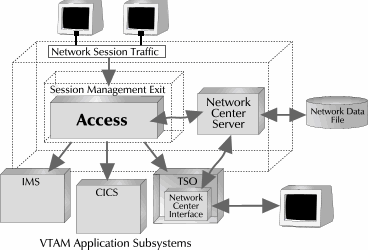
The Access Component allows an installation to control - from within VTAM - which LUs (such as terminals, subsystems or applications) may go into session with another LU in the VTAM domain. This allows for complete control over session approval or rejection within the local domain. This ability can be particularly beneficial in cross-domain or cross-network (SNI) situations where the remote domain is not secured in a manner that is acceptable to the local data center.
Access accepts installation defined definitions during VTAM initialization or interactively after initialization that control how session requests are approved. These conditions for approval can include LU name, time of day, day of week, originating node (subarea and/or netid), subsystem being requested, etc. Sessions can be conditionally accepted or rejected by Access.
Access allows users to combine multiple session "conditions" to approve or reject certain sessions under certain situations. For example, you can specify that devices from a particular subarea may only use specific subsystems during certain times of the day.
|
|
While Access is operating, it produces varying levels of messages in the standard Network Center LOG (SYSOUT or virtual printer). These messages indicate which sessions are accepted, conditionally accepted, or rejected. The Network Center's standard Accounting mechanism (OS SMF or VM Account records) can also record each session being approved, denied, or both. (Access provides this control by using the standard VTAM exit called the Session Management Exit 'ISTEXCAA'.)
As VTAM processes each session, Access receives control and obtains information that describes the session partners. This information includes the following items: [Adjsscp, Alias, Aliasnet, Hcvname, Hcvtype, Netid, Sscp, and Subarea are collected for both the OLU (SLU) and PLU (DLU). ]
After collecting session characteristics, the Network Center compares them against the active Access Rules, which control whether the session will be approved or denied.
Access Rules are identified by NAME and TITLE and may be written to ALLOW or DENY the proposed session. Rule status may be ACTIVE, DORMANT, or WARN, where WARN produces an audit of Rule processing but sessions are not rejected.
Consider the following Access Rules:
Note: The Rules are presented in both TNCRULE syntax as well as the actual screen appearance.
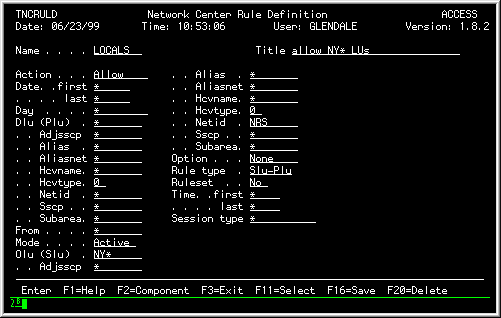
The LOCALS Rule allows any LU with "NY" in the first two characters of the name and with the NETID equal to "NRS" to go into session with any application. Access will reject any LU without this naming pattern:
LOCALS     TNCRULE SLU=NY*,NETID=NRS,
     ACTION=ALLOW
|
|
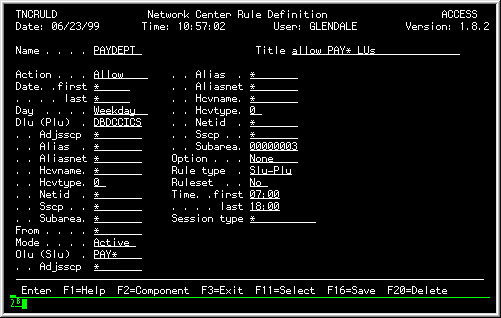
The PAYDEPT Rule allows any LU beginning with "PAY" from subarea "3" to establish a session with "DBDCCICS" between 7:00am and 6:00pm Monday through Friday. Access will deny any session requests from LUs that are outside of these specifications:
PAYDEPT     TNCRULE SLU=PAY*,SUBAREA=3,
     PLU=DBDCCICS,
     TIME=(0700,1800),DAY=WEEKDAYS,
     ACTION=ALLOW
|
The Rule definition panel would be defined as follows:
|
The next three Rules - LOGAPPL, TCAS, and TSO - show how Access can be used "pass" a session's access privileges from one application to another:
LOGAPPL     TNCRULE PLU=DIRECTOR,
     TYPE=AUTOLOGON,ACTION=ALLOW
TCAS     TNCRULE PLU=TSO,
     TYPE=THIRD-PARTY,
     FROM=DIRECTOR
TSO     TNCRULE PLU=TSO0*,
     TYPE=THIRD-PARTY,
     FROM=TSO
|
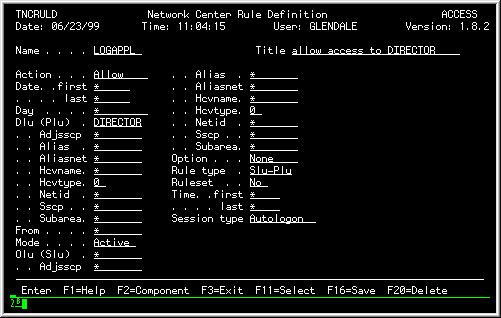
The LOGAPPL Rule allows any LU to go into session with a controlling PLU named DIRECTOR. The Rule definition panel would be defined as follows:
|
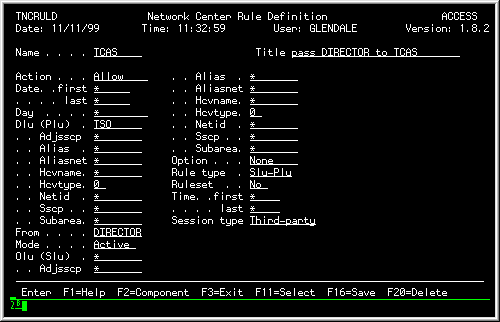
The TCAS Rule allows the Application DIRECTOR to pass ownership of the LU to the "TCAS" application. The Rule definition panel would be defined as follows:
|
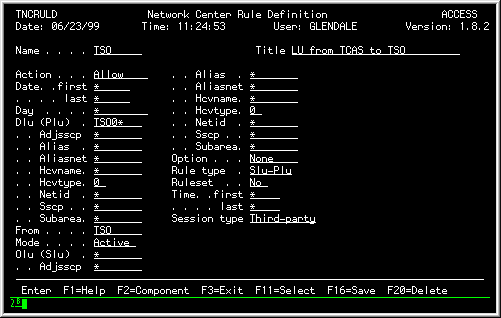
The TSO Rule allows "TCAS" to pass the LU to the created TSO address space. The Rule definition panel would be defined as follows:
|
The next three Rules - MYSITE, OUTSIDE, and DIRECTOR - show how you can use Access Rules to control which sessions from within or outside of your network will be approved or denied. (Remember, the types of Rules and conditions you can actually set are virtually limitless):
MYSITE     TNCRULE SUBAREA=3,
     PLU=*,ACTION=ALLOW
OUTSIDE     TNCRULE SLU=*,
     PLU=DIRECTOR,ACTION=ALLOW
DIRECTOR     TNCRULE FROM=DIRECTOR,
     TYPE=THIRD-PARTY,ACTION=ALLOW
|
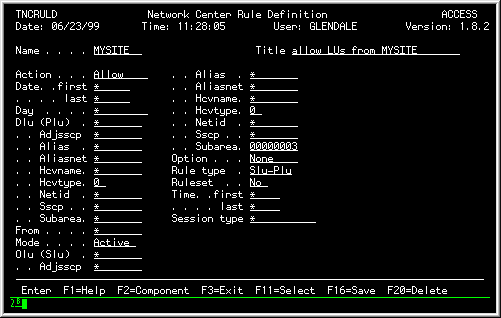
The MYSITE Rule allows any LU from subarea 3 to go into session with any application. The Rule definition panel would be defined as follows:
|
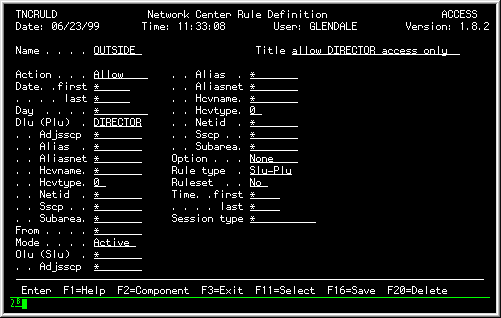
If the session request is not matched by the MYSITE Rule, the request is passed to the OUTSIDE Rule, which allows requesting sessions from outside of Subarea 3 with access to the DIRECTOR application, only. The Rule definition panel would be defined as follows:
|
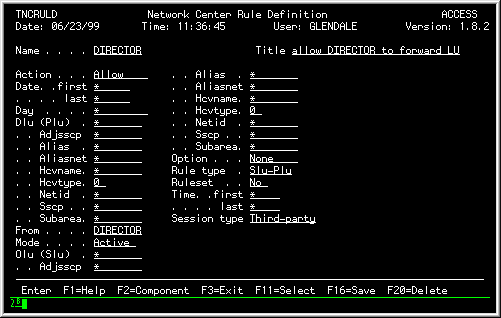
The DIRECTOR Rule allows the DIRECTOR application to forward the device to any application it chooses. The Rule definition panel would be defined as follows:
|
Alias provides the local installation with control over alias name assignment in the gateway SSCP. Alias provides facilities to create Rules, set the Alias names, dynamically maintain the Rules, and produce audit trail information.
You can use Alias to map resource names on a one to one basis. However, Alias also allows you to use very flexible, time-saving tactics including assigning alias names from a "pool" (or range) of predefined aliases, or assigning alias names from a group that contains a set of specific alias assignments.
The local installation defines the conditions under which alias name assignment is done. If no Rule exists mapping the connection, then Alias will allow the connection to function with the originating name.
Each time VTAM needs to obtain an Alias name for a logical unit, it travels through the Alias nucleus code residing in the Session Management Exit location. Alias then extracts the appropriate information for the connection being established, compares the information against the active Rules, and assigns an alias name, if required.
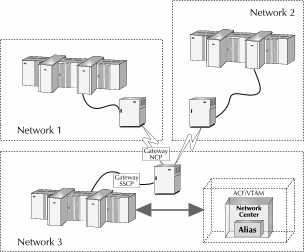
The following figure illustrates the basic Alias placement within a network:
|
As each session is being processed by VTAM, Alias receives control and collects several items that describe the session under evaluation. These items include: [Adjsscp, Alias, Aliasnet, Hcvname, Hcvtype, Netid, Sscp, and Subarea are collected for both the OLU (SLU) and PLU (DLU). ]
As Alias collects the session characteristics, it compares them against a set of active Alias Rules. The Rules are identified by NAME and TITLE and may be written to TRANSLATE or BYPASS the supplied alias translation request. Rule status may be ACTIVE, DORMANT, or WARN, where WARN produces an audit of Rule processing, but sessions are not rejected.
Consider the following Alias Rules: TNCRULE syntax as well as actual screen appearance.
In the following Alias Rules, one-to-one alias name translation has been defined.
T31001 TNCRULE SLU=T31001,OLUALIAS=OTHER01,
               NETID=OTHER,TO-NETWORK=NRS
T31002 TNCRULE SLU=T31002,OLUALIAS=OTHER02,
               NETID=OTHER,TO-NETWORK=NRS
|
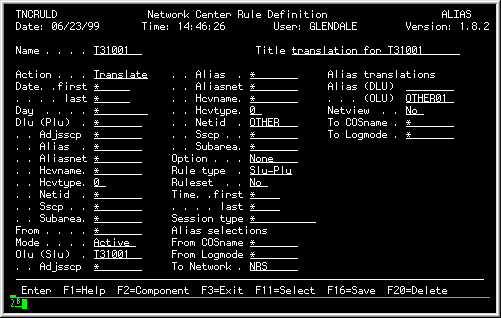
These Rules each simply translate the name of the incoming device, T31001 and T31002, from the OTHER Network to an LU name that begins with the character string "OTHER" within the local network, NRS. [The TO NETWORK operand must be specified to ensure that translation into our network (NRS) occurs properly. ] The Rule definition panel for T31001 would be defined as follows:
|
This is a simple approach to assigning Alias names in the NRS network but requires that you establish a Rule for every device that might contact the system.
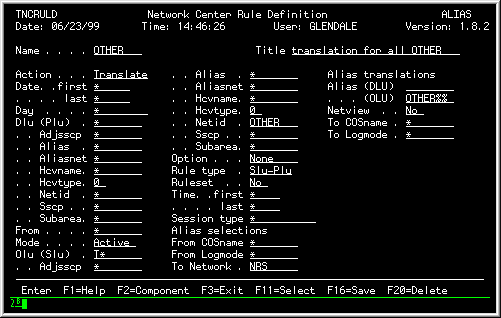
Now, let's assume that you would like to define a more general Rule that would allow any device originating from the OTHER network to receive a local Alias translation.
With this Rule, any device from the OTHER network whose LU name begins with "T" will be assigned a name from an Alias Pool, which is defined by the Alias Mask 'OTHER%%': the first device from the OTHER network will be assigned the name OTHER01, the second device will be assigned the name OTHER02 up to OTHER99.
OTHER TNCRULE SLU=T*,NETID=OTHER,OLUALIAS=OTHER%%,TO-NETWORK=NRS |
The Rule definition panel would be defined as follows:
|
The Network Center's Rule structure also provides a flexible mechanism called "Value Groups", which allow the local installation to group items together and then reference them once in a Rule.
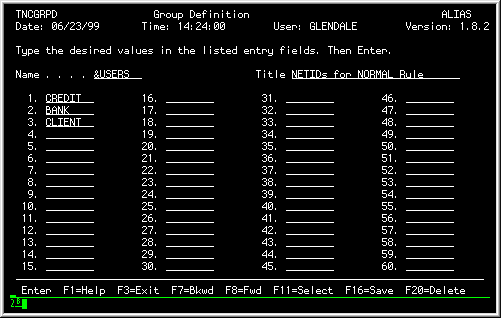
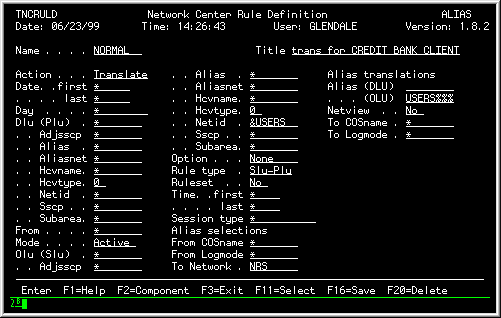
For example, assume that you would like cause Alias to allow name translation for three different networks. You create a Rule that assigns an Alias name from the USERSnnn Pool for any incoming device from the CREDIT, BANK, or CLIENT networks (this requires you to also define a Value Group for the Network IDs).
USERS TNCRULE VALUES=(CREDIT,BANK,CLIENT) NORMAL TNCRULE NETID=&USERS,TO-NETWORK=NRS,OLUALIAS=USERS%%% |
You would first define the networks' into a Value Group by using a Group Definition panel (the "&" at the beginning of the Group's name indicates that it is a Value Group), as follows:
|
You would then use this Value Group in the Rule, as in the following figure:
|
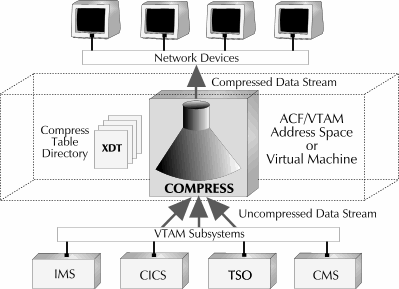
Compress allows users to create Rules, which, based on session type, compress 3270 data streams prior to transmission from local VTAM subsystems and applications. It uses the following mechanisms to compress the data:
Compress gives the installation control over session compression based on criteria such as LU name, time of day, day of week, originating node (subarea and/or netid), and subsystem being requested. Sessions can be compressed or denied compression.
The following figure illustrates the basic Compress placement within a network:
|
Compress produces various levels of messages in the standard Network Center LOG (SYSOUT or virtual printer). These messages indicate sessions that are compressed or denied compression. The Network Center's standard Accounting mechanism (OS SMF or VM Account records) can also record each session being compressed, denied compression, or both. Compress provides this control through the use of the standard VTAM exit called the the Session Management Exit.
As each session is being processed by VTAM, Compress receives control and obtains several items that describe the session being evaluated. These items include: [Adjsscp, Alias, Aliasnet, Hcvname, Hcvtype, Netid, Sscp, and Subarea can be specified for both the OLU (SLU) and DLU (PLU). ]
Session characteristics are compared against a set of active Compress Rules that control whether or not the session will be compressed.
The Rules are identified by NAME and TITLE and may be written to COMPRESS or DISABLE compression for the session. Rule status may be ACTIVE, DORMANT, or WARN, where WARN produces an audit of Rule processing, but sessions are not rejected.
Consider the following Compress Rules:
Note: The Rules are presented in both TNCRULE syntax as well as the actual screen appearance.
First, we would need to create Rules that disable compression for specific types of sessions. This will ensure that Compress does not compress any sessions that do not need to be compressed, or that should not be compressed.
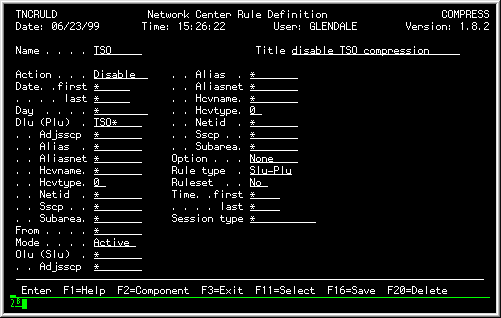
For example, because TSO already contains compression logic, we could create the following Rule, which disables compression for all TSO sessions originating from our local domain:
REMOTE TNCRULE ACTION=DISABLE,PLU=TSO*,SLU=R* |
The Rule definition panel would be defined as follows:
|
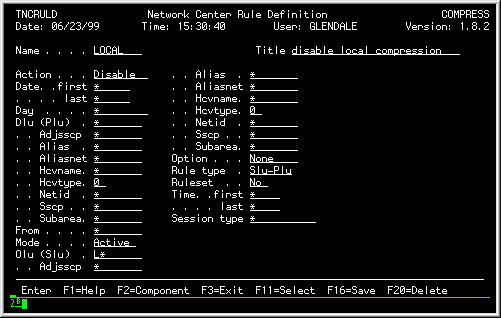
To further illustrate this point, let's assume that we also want to disable compression for all local sessions (local sessions usually do not benefit from compression). We could create the following Rule, which disables compression for all sessions within our local domain:
LOCAL TNCRULE ACTION=DISABLE,PLU=*,SLU=L* |
The Rule definition panel would be defined as follows:
|
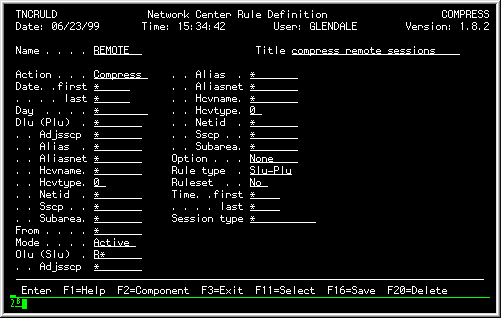
On the other hand, we do want to compress 3270 data that is transmitted to remote devices, so we create a Rule that compresses data between all PLUs and remote SLUs:
REMOTE TNCRULE ACTION=COMPRESS,PLU=*,SLU=R* |
The Rule definition panel would be defined as follows:
|
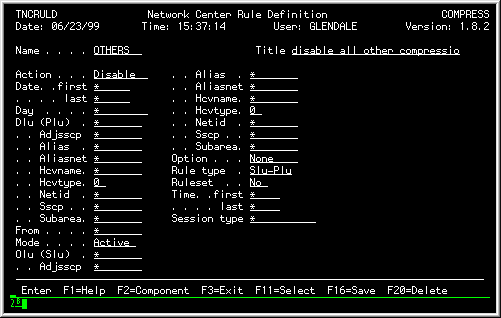
Finally, we realize that we do not want to compress non-3270 data streams, or anything else other than sessions between local and remote devices. Thus, we create a Rule that sits at the end of our Rule processing chain that denies all sessions that don't match the previous Rules:
OTHERS TNCRULE ACTION=DISABLE,PLU=*,SLU=* |
The Rule definition panel would be defined as follows:
|
The Query Component enhances and extends your ability to interrogate VTAM's operating definitions, active work queues, and other items within its operational environment while VTAM continues to execute.
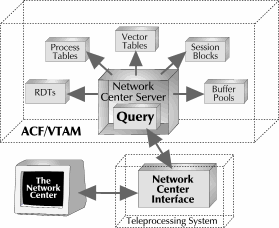
Query logically consists of the terminal handling routines and the Network Center Server, as the following figure illustrates:
|
Query is useful for VTAM Systems Programmers who already have, or would like to gain, a working knowledge of VTAM internals. Query can assist in diagnosing and correcting difficulties within an operational network or within VTAM itself.
Query interactively maintains definitions that identify how to map the individual blocks within VTAM. The Network Center includes descriptions for all commonly available releases of VTAM from 3.1.1 and on. The control block mappings that your installation uses is determined by the VTAM release in use.
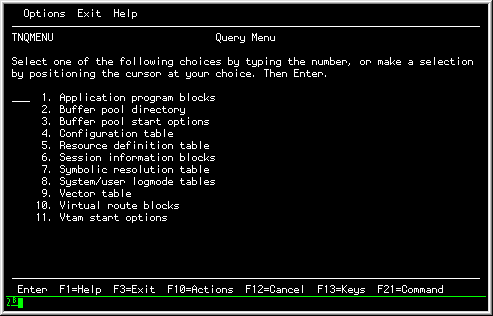
The Query menu (Query Selection List) provides the anchor point for Query requests and displays. The results of these requests and displays are produced in a selection list format, simple hexadecimal storage dump, or interpreted format. Individual fields within these displays may lead to another control block, or bit settings in individual control block fields. Control block fields that contain individual bit settings may also produce extended interpretation via a pop up window.
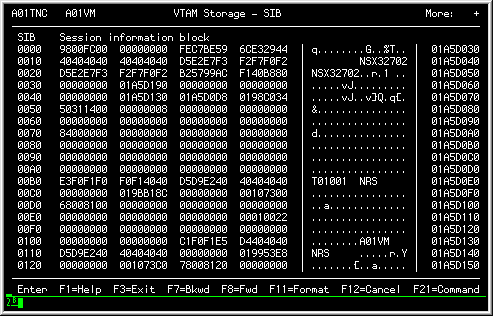
The following example shows an unformatted (i.e. hexadecimal) dump of a SIB (Session Information Block):
|
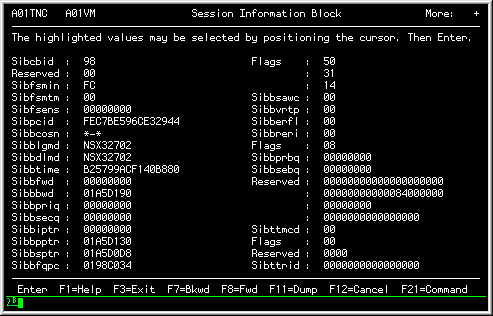
The control block can be formatted by placing Query into FORMAT mode, as shown in the following figure:
|
Query is delivered with a wide range of HELP panels that describe the various control blocks that can be displayed. You can also interpret Query information by referencing the appropriate IBM publications (the SNA Reference Summary, the VTAM Diagnosis Reference, VTAM Programming, VTAM Reference Summary (LY30-5600)), or by requesting that the Network Center format the control block.
Select provides the local installation with control over the various Lists used by VTAM during processing. Select provides a set of conditions called Select Rules, which allow you to manipulate the contents of the following lists:
Select's ability to set the contents of the list can help reduce overhead and improve network performance, restrict certain cross domain and cross network activities, control selection of logical connection between hosts ("Load Balance"), and allow the correct processing order to be set and adjusted interactively.
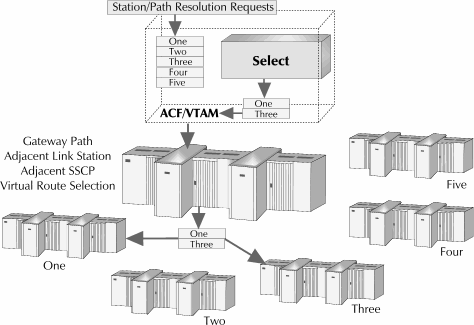
Each time VTAM needs to determine if a particular List of items is appropriate, it calls the Select routine residing in the Session Management Exit. Select extracts appropriate information associated with the connection being established, compares the information against the active Rules, and assigns or manipulates a Select List, if required.
The following figure illustrates Select's placement within a network:
|
Select Rules can be structured to control a wide variety of situations within VTAM. The following session characteristics can be used to define Select Rules: [Adjsscp, Alias, Aliasnet, Hcvname, Hcvtype, Netid, Sscp, and Subarea can be specified for both the OLU (SLU) and DLU (PLU). ]
Select Rules are identified by NAME and TITLE and may be written to SELECT, REPLACE, or BYPASS associated lists. Rule status may be ACTIVE, DORMANT, or WARN, where WARN produces an audit of Rule processing, but lists are not actually modified.
Each time Select is asked by VTAM to select a route, Select. evaluates the number of sessions that are in operation across the identified routes. Select chooses the route that is most below the desired weighting ratio and orders the list for VTAM such that the desired route is first in the list. In this manner, you can successfully "balance" the workload across the desired routes.
Consider the following Select Rules:
Note: The Rules are presented in both TNCRULE syntax as well as the actual screen appearance.
For our first example, let's say that you wish to assign a load balancing factor to two routes, VR1TP1 and VR2TP1, within the network TODC2. You want the high speed route, VR1TP1, to receive 65% of all session traffic, and VR2TP1 to receive the remainder at 35% of session traffic:
TWOPATHS TNCRULE LIST=(VR1TP1,65,VR2TP1,35) TODC2 TNCRULE ACTION=SELECT,SLU=*,NETID=TODC2,SELECT=TWOPATHS |
First, you would create the TWOPATHS Select List that assigns the weighting factors to these two routes:
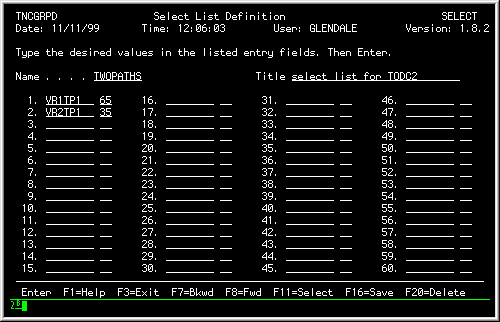
|
You would then define the TODC2 Rule, which describes when the TWOPATHS Select List should be used:
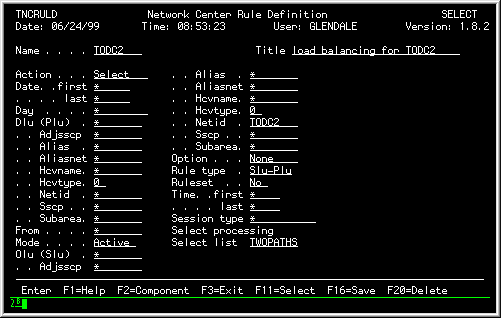
|
Now, let's say you want to add on to the "load balancing" by prioritizing CICS work over non-CICS work at a higher rate on the link. (Assume that you almost always want the CICS oriented work to be scheduled across the higher capacity link.):
CICSPATH TNCRULE LIST=(VR1TP1,90,VR2TP1,10) TWOPATHS TNCRULE LIST=(VR1TP1,65,VR2TP1,35) CICS TNCRULE ACTION=SELECT,PLU=CICS*,NETID=TODC2,SELECT=CICSPATH TODC2 TNCRULE ACTION=SELECT,SLU=*,NETID=TODC2,SELECT=TWOPATHS |
You would do this by creating a Select List for the new criteria, and a Rule that assigns the CICS work to the Select List, as follows:
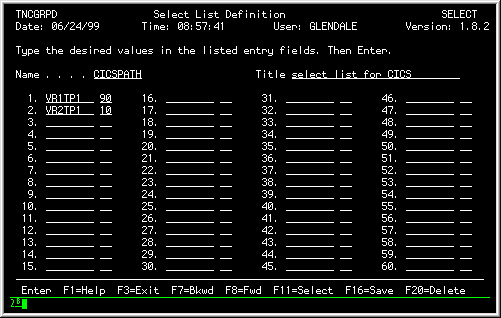
|
This Select List assigns 90% of of session traffic to the high-speed link, VR1TP1, and 10% of session traffic to the link VR2TP1.
You would then define the CICS Rule, which identifies the parameters for the CICSPATH Select List, as follows:
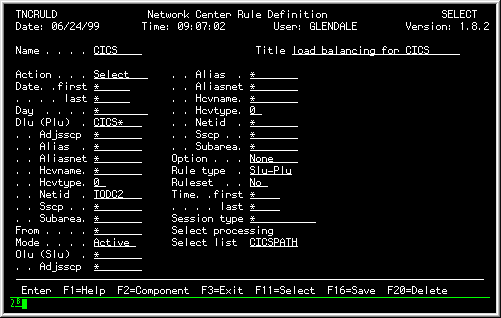
|
Note: By placing the CICS Rule prior to the TWOPATHS Rule in the Rule processing order, [For more information on setting the Rule processing order, see the Select Manual (publication TNC-0039). ] you would signify that sessions with any system starting with the letters CICS in the TODC2 network should have 90% of the sessions assigned to the higher priority route. All the other work in the network would be assigned to the routes according to the TWOPATHS Rule.
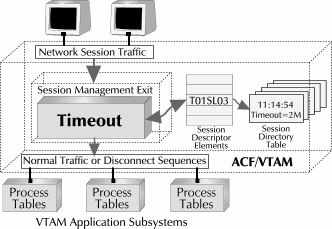
Timeout provides a domain wide method for monitoring activity levels of an individual LU session by monitoring each device that is in session with a subsystem, and automatically terminating the session if
Timeout provides assurance to security officers and data center management that abandoned devices (real or virtual) in a subsystem are not available for use by an improper individual. This disconnection also allows unnecessarily allocated resources to be returned to the system and made available for other uses.
Timeout monitoring occurs within the VTAM environment and is not dependent on any other timing facility in the VTAM subsystem (CICS, CMS, TSO, IMS, etc.).
When the interval elapses, Timeout generates a VTAM VARY command to cause the session to be disconnected between the logical units. This activity generates a LOSTERM condition to the subsystem, which causes the subsystem to "clean up" any allocated resources that the device may have held.
The following figure shows Timeout's general architecture:
|
The session disconnect conditions that Timeout applies to any given session is controlled by the standard Network Center Rule processing selection criteria (i.e. session disconnect can be set differently for specific subsets of the network).
Timeout Rules can be set to cause disconnection based on a variety of session-based characteristics.
The following characteristics may be included in Timeout Rules: [Adjsscp, Alias, Aliasnet, Hcvname, Hcvtype, Netid, Sscp, and Subarea can be specified for both the OLU (SLU) and DLU (PLU). ]
Timeout Rules are identified by NAME and TITLE. Rule status may be ACTIVE, DORMANT, or WARN, where WARN produces an audit of Rule processing but sessions are not actually terminated.
Consider the following Timeout Rules:
Note: The Rules are presented in both TNCRULE syntax as well as the actual screen appearance.
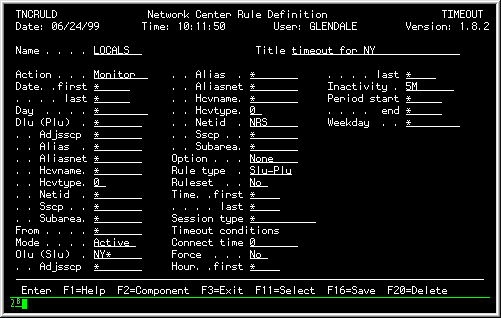
The following Rule establishes an allowable idle time interval of five minutes between sessions, for any LU with "NY" in the first two characters of the name and that is in the NRS network. Once the idle interval exceeds 5 minutes, the session will be terminated:
LOCALS     TNCRULE SLU=NY*,NETID=NRS,
     INACTIVITY=5M
|
The Rule definition panel would be defined as follows:
|
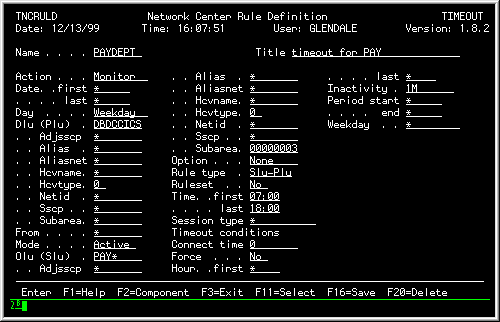
You can also create Rules that set an idle time interval with a time parameter as well. For example, the PAYDEPT Rule sets a 1 minute idle interval for any LU beginning with "PAY" from SUBAREA "3" when in session with "DBDCCICS" between 7:00am and 6:00pm Monday through Friday. Any other LU's, or those LU's outside of the time and day interval will not have their sessions subject to Timeout idle time checking:
PAYDEPT     TNCRULE SLU=PAY*,SUBAREA=3,
     PLU=DBDCCICS,INACTIVITY=1M
     TIME=(0700,1800),DAY=WEEKDAYS,
     ACTION=MONITOR
|
The Rule definition panel would be defined as follows:
|
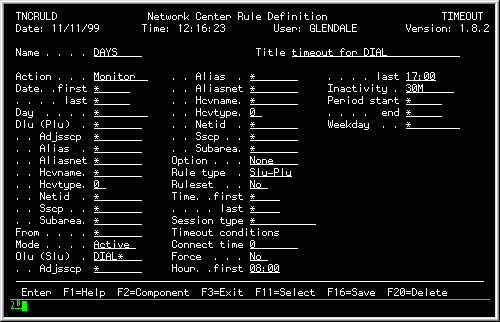
The next example, the DAYS Rule, also shows a Timeout Rule with a time parameter. The DAYS Rule will cause any session initiated by devices with "DIAL" in the first four bytes of the LU to be terminated unless the time of day is between 8 am and 5 pm. Any sessions that exist after 5pm will be terminated. When a session occurs within the defined HOURs, it will be subject to a 30 minutes inactivity timer:
DAYS     TNCRULE SLU=DIAL*,ACTION=MONITOR,
     HOURS=(0800,1700),INACTIVITY=30M
|
The Rule definition panel would be defined as follows:
|
Trace provides the facilities to interactively collect and view the session activity associated with a PLU-SLU pair within VTAM by creating Rules that control what sessions will be traced (or not traced) and whether Inbound or Outbound, User or VTAM buffers are to be traced. (There is no requirement to activate the GTF trace (MVS and OS/390) or any GTRACE (VM), etc. facilities.)
You'll typically use Trace to evaluate and interpret whether session traffic is proper, but it can also help you understand how "normal" traffic flows.
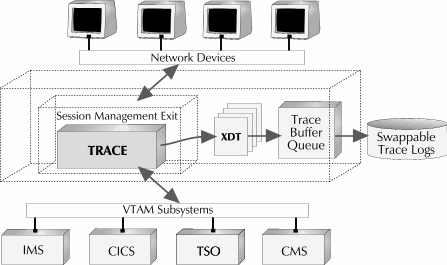
Trace internally activities the actual VTAM internal trace facility to collect information. (This insures that the trace information you receive is identical to that of a standard VTAM trace.) VTAM trace operations are intercepted by Trace, which resides in the VTAM Session Management exit, collected into a storage queue, and staged to external disk files, as necessary. These entries are subsequently available for interactive viewing and evaluation in the Trace queue. The Trace queue allows you to select items for further details.
The following figure illustrates how Trace collects and disperses information:
|
As each session is being processed by VTAM, Trace receives control and obtains several items that describe the session being evaluated. These items include: [Adjsscp, Alias, Aliasnet, Hcvname, Hcvtype, Netid, Sscp, and Subarea are collected for both the OLU (SLU) and PLU (DLU). ]
Trace Rules are identified by NAME and TITLE and may be written to TRACE or DISABLE tracing for a particular session or type of session. Rule status may be ACTIVE, DORMANT, or WARN, where WARN produces an audit of Rule processing, but sessions are not traced.
Consider the following Trace Rules:
Note: The Rules are presented in both TNCRULE syntax as well as the actual screen appearance.
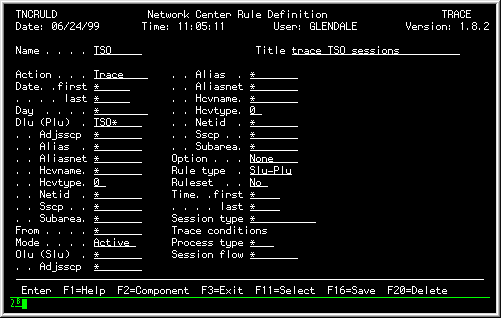
The TSO Rule indicates that any session between the subsystem TSO and any other resources should be traced, and that VTAM and USER, and INBOUND and OUTBOUND buffers are to be traced.
TSO TNCRULE PLU=TSO*,SLU=*,PROCESS-TYPE=*,SESSION-FLOW=*,ACTION=TRACE |
The Rule definition panel would be defined as follows:
|
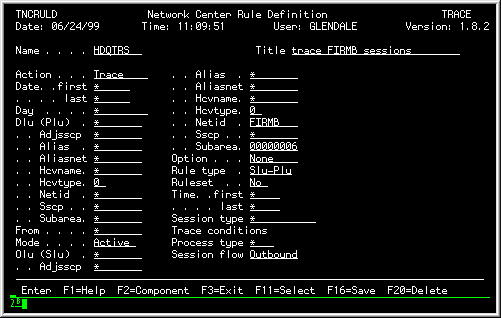
The next Rule, HDQTRS, specifically traces sessions between devices that originate from the Network known as FIRMB in Subarea 6 that have access to your TSO subsystem. Specifically, this Rule traces FIRMB sessions that have directly connected to TSO by issuing an Unformatted System Services or equivalent request (E.G. "LOGON APPLID(TSO)"). Outbound buffers only will be traced.
HDQTRS     TNCRULE PLU=*,SLU=*,OLU-NETID=FIRMB,OLU-SUBAREA=6,
     PROCESS-TYPE=*,SESSION-FLOW=OUTBOUND,ACTION=TRACE
|
The Rule definition panel would be defined as follows:
|
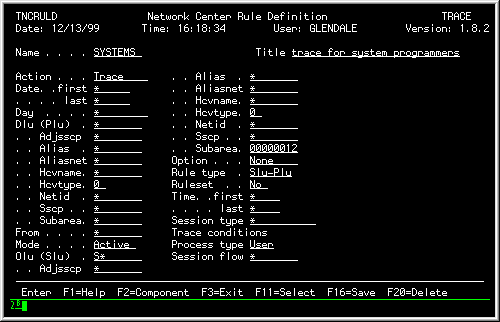
The following Rule traces sessions between a specific set of devices in subarea 12 and any network starting with an "S". Only buffers produced by the User applications will be traced.
SYSTEMS     TNCRULE PLU=*,SLU=S*,OLU-NETID=NRS,OLU-SUBAREA=12,
     PROCESS-TYPE=USER,SESSION-FLOW=*,ACTION=TRACE
|
The Rule definition panel would be defined as follows:
|